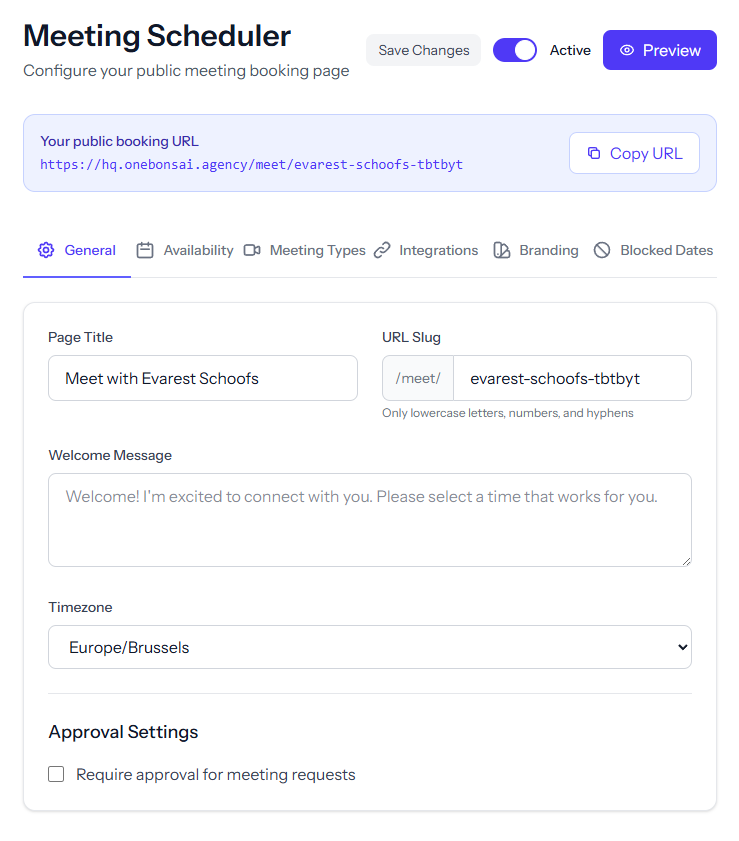
Scheduling Page
General
Custom URL slug, title, welcome message, timezone, active/inactive toggle, and copyable public URL.
Availability
Per-day available hours, minimum notice period, maximum days ahead, and buffer times between meetings.
Meeting Types
30-minute and 1-hour durations with platform options (Google Meet, Microsoft Teams, Zoom, In-person).
Integrations
Connect/disconnect Google Calendar, Microsoft Calendar, and Zoom via OAuth.
Branding
Logo upload/remove, background and accent color pickers.
Blocked Dates
Add/remove blocked date ranges with reason and optional yearly recurrence.
Approval & Gap Settings
Require approval before confirming, configurable gaps between online and in-person meetings.
Meeting Notes & Action Items
Structured Notes
Create notes during or after meetings with agenda topics, discussion points, and decisions recorded in a clean, searchable format.
Action Items
Assign follow-up tasks to team members directly from meeting notes, with due dates and status tracking.
Attendee Linking
Associate notes with internal team members and external contacts so everyone has context.
History & Search
Browse past meeting notes by date, attendee, or keyword to quickly retrieve decisions and commitments.
Use Cases
Client Onboarding
Share a booking link during the sales handoff so new clients can schedule their kick-off call without delay.
Recurring Check-Ins
Set up weekly or bi-weekly slots for team stand-ups and one-on-ones with automatic reminders.
External Consultations
Allow partners or vendors to book time on your calendar with approval required for in-person visits.
Sales Discovery Calls
Embed your booking page on your website so prospects can self-schedule a demo or introductory call.
Ready to simplify your workflow?
Meetings is just one of many tools in the Simplify Suite. See how they all work together.